// 执行命令和脚本
agent-desktop(AI 代理桌面操作 CLI)
agent-desktop 是 Vercel Labs 以 Apache-2.0 许可证开源的「电脑操作」(computer use)命令行工具,供 AI 代理查看并操作 macOS、Windows 和 Linux 上的桌面应用。它不依赖截图或像素识别,而是读取系统无障碍树(macOS 的 AX API、Windows 的 UI Automation、Linux 的 AT-SPI),以 JSON 输出界面结构,并为每个可操作元素分配引用编号;代理按编号点击或输入,再重新读取界面核对结果。工具本身不内置模型,决策循环由调用它的代理负责,以 CLI 和 C 库两种形式提供,默认无头执行、不移动鼠标。可通过 npm 或 Homebrew 安装。官方提示快照、剪贴板与截图可能含隐私内容,不宜上传到公开日志。
开源 维护中 给 AI 用
一段话结论
agent-desktop(AI 代理桌面操作 CLI) 是agent-desktop 是 Vercel Labs 以 Apache-2.0 许可证开源的「电脑操作」(computer use)命令行工具,供 AI 代理查看并操作 macOS、Windows 和 Linux 上的桌面应用。它不依赖截图或像素识别,而是读取系统无障碍树(macOS 的 AX API、Windows 的 UI Automation、Linux 的 AT-SPI),以 JSON 输出界面结构,并为每个可操作元素分配引用编号;代理按编号点击或输入,再重新读取界面核对结果。工具本身不内置模型,决策循环由调用它的代理负责,以 CLI 和 C 库两种形式提供,默认无头执行、不移动鼠标。可通过 npm 或 Homebrew 安装。官方提示快照、剪贴板与截图可能含隐私内容,不宜上传到公开日志。
适合:想让自己的 agent(Claude Code、Codex、Cursor 等)执行命令和脚本的开发者。
不适合:不想自己安装和运行工具的人。
01怎么开始
- 1先读官方 README / 文档,确认运行环境和需要的权限。
- 2按官方说明安装。
- 3在 AGENTS.md / CLAUDE.md 里写明这个工具和用法,agent 才知道什么时候调用。
02README(项目原文)
以下内容来自 vercel-labs/agent-desktop 的 README,许可证 Apache-2.0,版权归原作者。 查看原文 ↗
agent-desktop
Computer use for AI agents: see and operate desktop apps on macOS, Windows, and Linux through the OS accessibility tree.
agent-desktop gives an AI agent computer use without screenshots or pixel matching. It reads the accessibility tree of a desktop app and returns it as JSON, with a ref for every element the agent can act on. The agent clicks or types on a ref, reads the UI again to check the result, and repeats. The loop lives in your agent; agent-desktop has no model inside. It ships as a CLI and a C library.
Snapshots, clipboard reads, screenshots, command output, and debug artifacts can contain private desktop content. Keep them out of public logs and uploads.
Install
npm install -g agent-desktop
agent-desktop status                # platform, permissions, supported surfaces
agent-desktop permissions --guide   # macOS: walks you through the Accessibility grant
Bun, Yarn and pnpm can install the same package. It includes native binaries and platform helpers for x64 and ARM64. For direct execution without a JavaScript launcher, download the matching native archive from GitHub Releases and keep its helper beside the executable.
On macOS and Linux, Homebrew also works: brew install agent-desktop. There is no official Scoop package yet.
The repository no longer maintains a custom Homebrew tap or Scoop bucket.
Release archives and building from source are covered in Installation.
Quick start
agent-desktop snapshot --app Finder -i      # interactive elements, each with a ref
agent-desktop click @s8f3k2p9:e8            # act on a ref from that snapshot
agent-desktop snapshot --app Finder -i      # observe again to verify
Each command prints one JSON envelope. A trimmed snapshot:
{
  "version": "2.6",
  "ok": true,
  "command": "snapshot",
  "data": {
    "app": "Finder",
    "snapshot_id": "s8f3k2p9",
    "ref_count": 59,
    "complete": true,
    "tree": {
      "role": "window",
      "name": "Downloads",
      "children": [
        { "role": "treeitem", "name": "Documents", "ref_id": "@s8f3k2p9:e8", "available_actions": ["Click"] }
      ]
    }
  }
}
- Refs carry their snapshot id. A bare
@e8fails withINVALID_ARGS. - If the UI changed, an action returns
STALE_REForAMBIGUOUS_TARGET. Take a new snapshot and use its refs. - Actions are headless by default: no pointer movement, no focus change. Pass
--headedfor physical input. type,set-value, andclipboard-setaccept--stdinfor piped text, keeping it out of process arguments. Run secret steps as separate commands; batch JSON text appears in process arguments.- In PowerShell, quote every ref (
'@s8f3k2p9:e8'), because a bare@tokenis the splatting operator.
The full walkthrough is in the quick start.
How it works
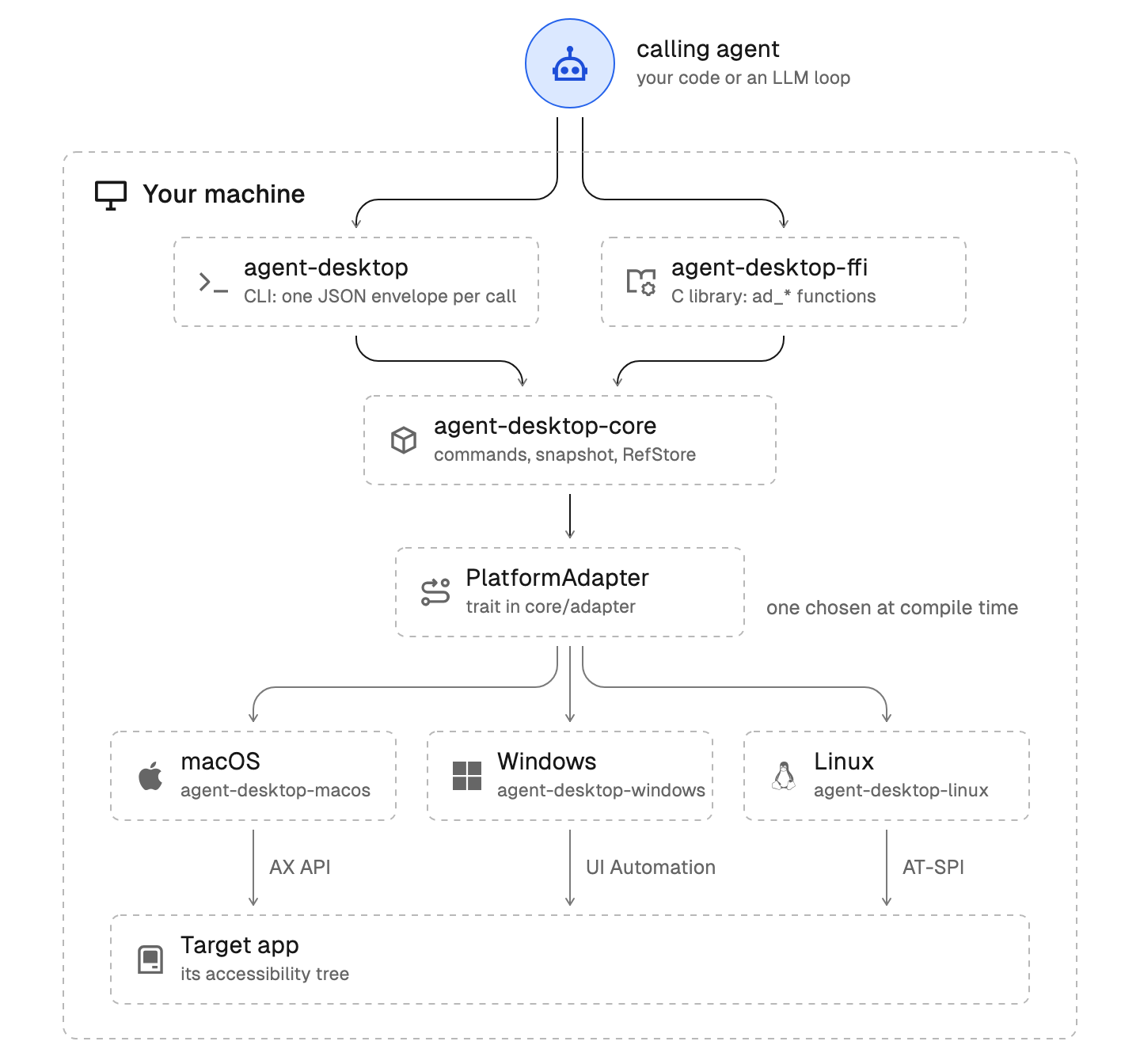
Your agent calls the CLI, or the C library in process. Both run the same core, which reaches the OS only through PlatformAdapter. Each binary is built for one OS and talks to that OS's accessibility API.
For AI agents
The binary carries guides that match its version:
agent-desktop skills get desktop      # the loop, refs, verification and retry rules
agent-desktop skills get platform     # what differs on the OS you run on
agent-desktop <command> --help        # flags for one command
Install the skill into an agent harness from skills.sh:
npx skills add https://github.com/vercel-labs/agent-desktop --skill agent-desktop
Or add this to your AGENTS.md:
Use `agent-desktop` to see and operate desktop apps. Before the first use, run
`agent-desktop skills get desktop` and `agent-desktop skills get platform`, and follow them.
Retry a failed command only when error.disposition.retry is safe. See JSON output for the envelope, error codes, and exit codes.
MCP
agent-desktop mcp serves every command as an MCP tool over stdio. A tool is named after its command (desktop_snapshot, desktop_click, desktop_session_start), takes that command's arguments, and returns its JSON envelope:
{ "mcpServers": { "agent-desktop": { "command": "agent-desktop", "args": ["mcp"] } } }
Global flags given to mcp, such as --session, --headed or --trace, apply to every call.
Commands
agent-desktop has 60 command names, 56 operational commands. The other four (key-down, key-up, mouse-down, mouse-up) refuse to run until a daemon can release a held key or button. Commands documents each one.
| Group | Commands |
|---|---|
| Observe | snapshot, find, get, is, screenshot, list-surfaces |
| Act on a ref | click, double-click, triple-click, right-click, type, set-value, clear, focus, select, toggle, check, uncheck, expand, collapse, scroll, scroll-to |
| Keyboard and mouse | press, hover, drag, mouse-move, mouse-click, mouse-wheel, key-down, key-up, mouse-down, mouse-up |
| Apps and windows | launch, close-app, list-apps, list-windows, list-displays, focus-window, resize-window, move-window, minimize, maximize, restore, open-system-surface |
| Notifications | list-notifications, dismiss-notification, dismiss-all-notifications, notification-action |
| Clipboard | clipboard-get, clipboard-set, clipboard-clear |
| Wait | wait |
| Sessions | session, trace, cursor-overlay |
| System | status, permissions, version, batch, skills |
Platform support
| Platform | Requirement | Accessibility API |
|---|---|---|
| macOS | macOS 13 or later, Intel or Apple Silicon | AX API |
| Windows | Windows 10 1809 or later, x64 or ARM64 | UI Automation |
| Linux | Ubuntu 24.04 or later, x86_64 or aarch64, X11 or Wayland | AT-SPI |
Each platform page lists what works headless, what needs --headed, and what refuses.
C library
Each release ships libagent_desktop_ffi, so a program can call agent-desktop in process. See the C library docs.
import ctypes
lib = ctypes.CDLL("./lib/libagent_desktop_ffi.dylib")
lib.ad_adapter_create.restype = ctypes.c_void_p
lib.ad_adapter_destroy.argtypes = [ctypes.c_void_p]
assert lib.ad_init(7) == 0  # AD_RESULT_OK when the header's AD_ABI_VERSION_MAJOR matches the library
adapter = lib.ad_adapter_create()
lib.ad_adapter_destroy(adapter)
Development
Each platform adapter builds only on its own OS, so scope cargo to the host's packages. On macOS:
HOST_PKGS=(-p agent-desktop-core -p agent-desktop-macos -p agent-desktop -p agent-desktop-ffi)
cargo test "${HOST_PKGS[@]}"
cargo clippy "${HOST_PKGS[@]}" --all-targets -- -D warnings
On Windows, use agent-desktop-windows instead of agent-desktop-macos; on Linux, agent-desktop-linux. CONTRIBUTING.md lists every gate.
Documentation
- Introduction: what it is and how it works
- Snapshots and refs
- Errors and recovery
- Skills
- CONCEPTS.md: vocabulary
- CONTRIBUTING.md, SECURITY.md, SUPPORT.md
License
Apache-2.0
03替代品与对比
并排对比 →04相关
版本历史 · 收录依据 · 给 AI 读
给 AI 读
- 调用方式:自身应用或网页
- 机器可读档案:/api/v1/software/agent-desktop.json · llms.txt
- 收录于 2026-11-05 · 更新于 2026-11-07